i18n: folder vs field level translations
Field level translations
Official documentation: https://www.storyblok.com/docs/guide/in-depth/internationalization#field-level-translation (opens in a new tab)
Field translations are widely used at EF. With this strategy we can define all field types other than blok type to be translatable.
To define field level languages in storyblok, you have to navigate to Settings -> Internationalization
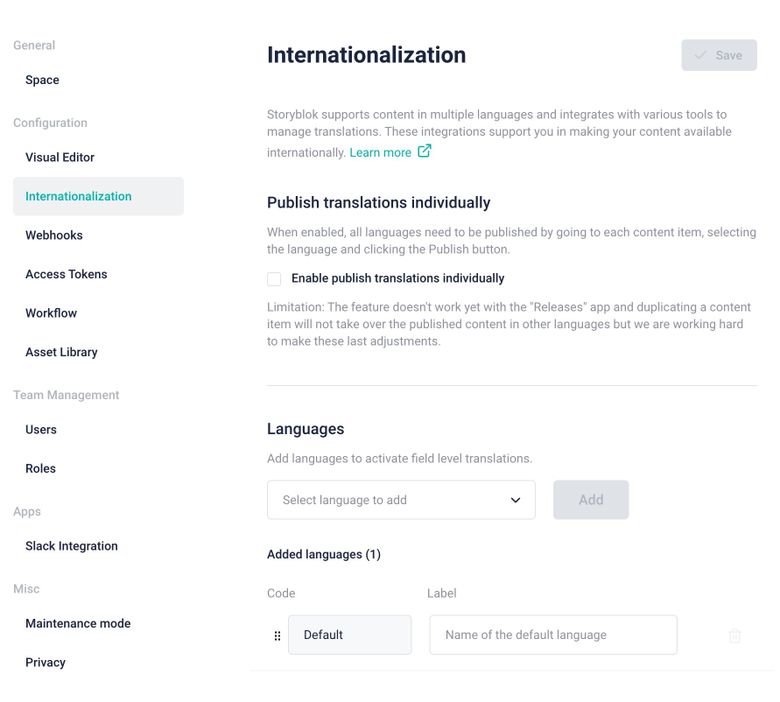
Internationalization menu
Add the languages you need here. We currently are working on synchronising languages between code and this menu. For now we have to set them manually here.
For code, see section:
Set languages in codePros and cons of field level translations
Pros
- Easy to manage content translation with dropdown.
- Since adding
full_slugto thepublishwebhook, it has become a lot easier to revalidate pages. - Easy to manage translations with language dropdown.
Cons:
- Only 1 editor can edit the page at a time to change content.
- We recommend using the Content Locking app to prevent multiple people overriding each others work.
- Page design needs to be the same for all languages.
- Storyblok Real Path option breaks editor preview.
- Copying and pasting sections can become messy as field level translations are also copied.
Folder level translations
Official documentation: https://www.storyblok.com/docs/guide/in-depth/internationalization#folder-level-translation (opens in a new tab)
Pros and cons of folder level translations
Pros:
- Content can be tailored to each market.
- Design can be updated market by market rather than for all at the same time
- Multiple editors can edit different languages at the same time since they are all different pages.
- Easy to connect content via Dimensions app.
- Each lang/market is a folder.
Cons:
- Dimensions app needs to be installed and can delete content on Merge when you merge content to another page.
- Languages need to be folders at root level.
How to set translation strategy in boilerplate?
You can control it by settings this environment variable.
NEXT_PUBLIC_TRANSLATION_STRATEGY=folder
There is also an option to be set in src/constants/general.ts called localeInDomainUrl. This will disable showing the default locale in the url.
https://yoursite.com/en (opens in a new tab) vs https://yoursite.com/ (opens in a new tab) if en is your default language.
Set languages in code
To set the languages in code, navigate to the repo that you created with create-backpack-app and go to src/lib/i18n/languageMap.mjs.
Here you can set languages with a fallback_lang like so:
_23export const languageMap = {_23 defaultLocale: 'en',_23 locales: {_23 'en': {_23 label: '(Master) English'_23 },_23 'en-us': {_23 label: 'English (US)',_23 fallback_lang: 'en'_23 },_23 'de': {_23 label: '(Master) German'_23 },_23 'de-ch': {_23 label: 'German (Switzerland)',_23 fallback_lang: 'de'_23 },_23 'de-at': {_23 label: 'German (Austria)',_23 fallback_lang: 'de'_23 }_23 }_23}
This file will be read by next.config.mjs and will load locales automatically.
One quirk about fallback_lang and storyblok, your content will load correctly in the fallback language you defined in the iframe but on the storyblok field that is not translated and should load fallback, you will still see your default language.
This doesn’t affect the content at all and should be disregarded until they fix it.